
Notifications
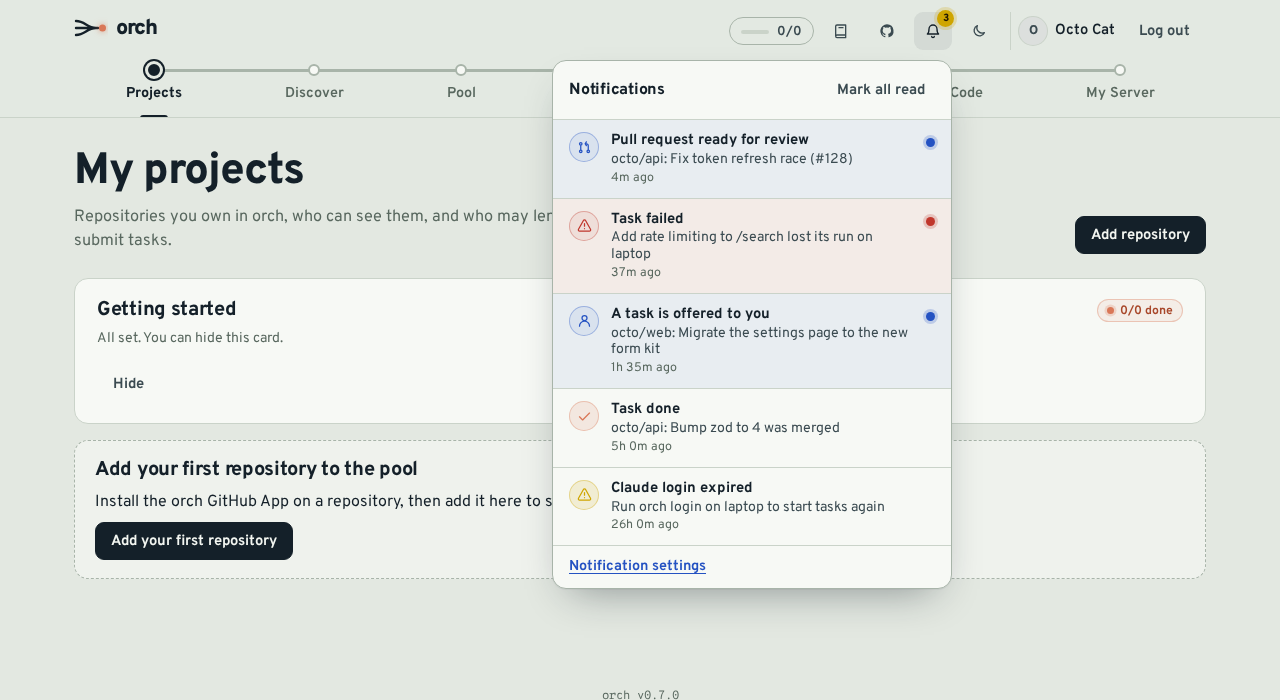
orch tells you when something needs you: a task you created is merged or fails, a PR waits for review, a task is offered to you, or someone asks to join your pool or your server. Notifications show up in the app (the bell in the header) and, if you want, in your browser, in Slack, Discord, any JSON webhook or by e-mail.
Events
Section titled “Events”| Event | Sent to | When |
|---|---|---|
| Task done | The task’s creator and the member who ran it | The task’s PR is merged |
| Task failed | The creator and the member whose machine ran it | A run fails, produces no changes, or is lost (the agent stopped reporting) |
| Needs attention | The creator and the project owner | A task stops being dispatched after repeated setup (env) failures |
| The agent’s owner | Claude rejects the login of one of your agents (run orch login on that machine) | |
| PR ready for review | The project owner and the creator | orch opens the PR of a task, or someone opens a PR on a task branch |
| Task offered to you | The member it is offered to | A consent request (APPROVAL mode) waits for your answer |
| Access request | Admins (ORCH_ADMIN_GITHUB_LOGINS) who signed in | Someone asks for access to the server |
| Participation request | The project owner | Someone asks to join the pool of a project that requires approval (once per request) |
You are never notified about something you did yourself in the web app (for example, approving your own request).
Channels
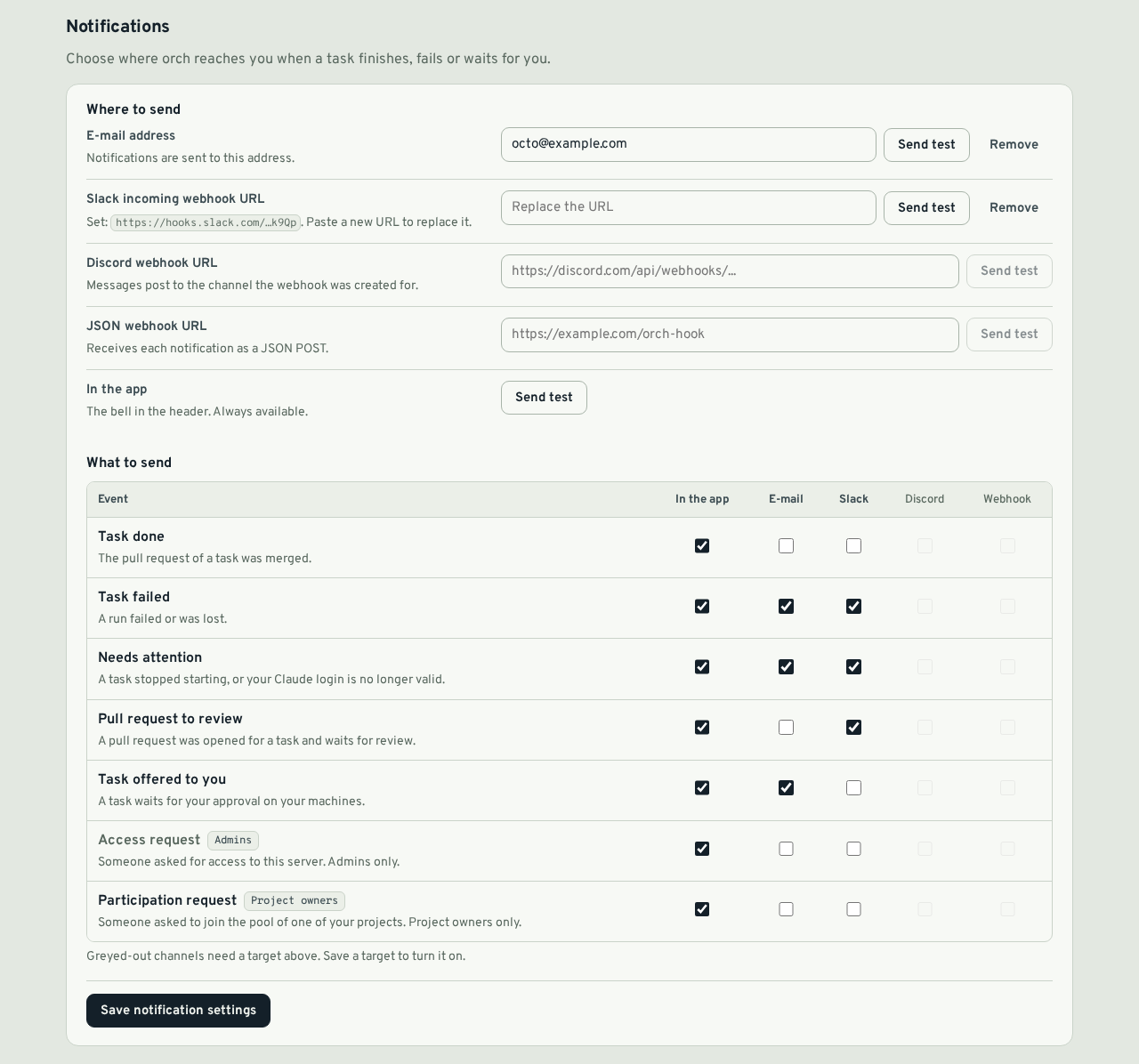
Section titled “Channels”Set them up on My Server → Notifications, then choose, per event, which channels it goes to. By default every event goes to the app only. Each channel has a Send test button that sends one message right away and shows the result.
| Channel | What you enter |
|---|---|
| In-app | Nothing. The bell shows the unread count; notifications are kept 90 days (NOTIFY_RETENTION_DAYS) |
| An address, confirmed by a link (see below). Only offered when the server has SMTP settings | |
| Slack | A Slack incoming webhook URL. Mattermost works too |
| Discord | A channel webhook URL |
| Webhook | Any https URL that accepts a JSON POST |
| Browser | Nothing to type: switch on Enable browser notifications in each browser you want (see below) |
Webhook URLs are secrets (anyone who has one can post to your channel). orch stores them encrypted with ORCH_ENCRYPTION_KEY and only ever shows a masked hint such as https://hooks.slack.com/…k9Qp. To change one, paste a new URL; Remove deletes it.
Generic webhook payload
Section titled “Generic webhook payload”{ "version": 1, "id": "cm3…", "event": "task_failed", "title": "Run failed: Add rate limiting to /search", "body": "acme/api#42: tests failed. The task went back to the pool.", "url": "https://orch.example.com/backlog?task=cm2…", "projectId": "cm1…", "taskId": "cm2…", "createdAt": "2026-10-22T09:14:03.120Z"}event is one of task_done, task_failed, task_needs_attention, pr_review, consent_request, access_request, participation_request. url is the PR for task_done and pr_review, otherwise a page of the web app. Any 2xx answer counts as delivered; redirects are not followed.
Verifying webhook signatures
Section titled “Verifying webhook signatures”Generic JSON webhooks are signed following the Standard Webhooks spec, so you can check that a request really comes from your orch server. Slack and Discord targets are not signed (those services have no such mechanism).
When you save a webhook URL, orch generates a signing secret (whsec_ followed by base64) and shows it once, with a copy button. It is stored encrypted with ORCH_ENCRYPTION_KEY, like the URL, and only a hint such as ••••abcd is displayed afterwards. A webhook configured before signing existed has no secret: use Generate secret under My Server → Notifications.
Every request carries three headers:
| Header | Content |
|---|---|
webhook-id | Unique id of the delivery (msg_…). Identical on every retry of the same delivery |
webhook-timestamp | Unix time in seconds when this attempt was sent (it changes on each retry) |
webhook-signature | v1,<base64>: HMAC-SHA256 of <webhook-id>.<webhook-timestamp>.<raw body>; several signatures may be listed, separated by spaces |
The HMAC key is the base64-decoded part of the secret after whsec_. Always sign the raw request body, byte for byte, not a re-serialised JSON.
Idempotency. orch retries failed deliveries, and a receiver may also see a delivery twice when its 2xx answer is lost. Deduplicate on webhook-id: the same id means the same notification.
Timestamp tolerance. Reject requests whose webhook-timestamp is too far from your clock (5 minutes is the usual tolerance); this stops an attacker from replaying a captured request later. Retries are re-signed with a fresh timestamp, so a retry arriving hours later is still accepted.
Rotating the secret. Rotate secret generates a new secret (shown once). For 24 hours, requests are signed with both the new and the previous secret (two space-separated values in webhook-signature), so you can deploy the new secret without losing deliveries. Accept a request as soon as one signature matches.
Test vector. Use it to check your implementation:
secret: whsec_YWFhYWFhYWFhYWFhYWFhYWFhYWFhYWFhwebhook-id: msg_p5jXN8AQM9LWM0D4loKWxJekwebhook-timestamp: 1614265330body: {"test": 2432232314}signature: v1,p/aCZAPUoPHV4ef7o8HCy2oI82P4UXjmN+MG//Bx9gE=Node.js (Express: use the raw body, for example express.raw({ type: 'application/json' })):
import { createHmac, timingSafeEqual } from 'node:crypto';
export function verify(secret, headers, rawBody, toleranceSec = 300) {  const id = headers['webhook-id'];  const ts = Number(headers['webhook-timestamp']);  if (!id || !Number.isFinite(ts) || Math.abs(Date.now() / 1000 - ts) > toleranceSec) return false;  const key = Buffer.from(secret.replace(/^whsec_/, ''), 'base64');  const expected = createHmac('sha256', key).update(`${id}.${ts}.${rawBody}`).digest();  return String(headers['webhook-signature'] ?? '')    .split(' ')    .some((sig) => {      const [version, value] = sig.split(',');      if (version !== 'v1' || !value) return false;      const got = Buffer.from(value, 'base64');      return got.length === expected.length && timingSafeEqual(got, expected);    });}
Python:
import base64, hashlib, hmac, time
def verify(secret: str, headers: dict, raw_body: bytes, tolerance: int = 300) -> bool:    msg_id = headers.get("webhook-id", "")    try:        ts = int(headers.get("webhook-timestamp", ""))    except ValueError:        return False    if not msg_id or abs(time.time() - ts) > tolerance:        return False    key = base64.b64decode(secret.removeprefix("whsec_"))    signed = f"{msg_id}.{ts}.".encode() + raw_body    expected = base64.b64encode(hmac.new(key, signed, hashlib.sha256).digest()).decode()    for sig in headers.get("webhook-signature", "").split(" "):        version, _, value = sig.partition(",")        if version == "v1" and hmac.compare_digest(value, expected):            return True    return False
Go:
import (  "crypto/hmac"  "crypto/sha256"  "encoding/base64"  "math"  "strconv"  "strings"  "time")
func Verify(secret string, h map[string]string, rawBody []byte, tolerance time.Duration) bool {  id := h["webhook-id"]  ts, err := strconv.ParseInt(h["webhook-timestamp"], 10, 64)  if err != nil || id == "" {    return false  }  if math.Abs(float64(time.Now().Unix()-ts)) > tolerance.Seconds() {    return false  }  key, err := base64.StdEncoding.DecodeString(strings.TrimPrefix(secret, "whsec_"))  if err != nil {    return false  }  mac := hmac.New(sha256.New, key)  mac.Write([]byte(id + "." + strconv.FormatInt(ts, 10) + "."))  mac.Write(rawBody)  expected := base64.StdEncoding.EncodeToString(mac.Sum(nil))  for _, sig := range strings.Split(h["webhook-signature"], " ") {    if v, ok := strings.CutPrefix(sig, "v1,"); ok && hmac.Equal([]byte(v), []byte(expected)) {      return true    }  }  return false}
Browser notifications
Section titled “Browser notifications”With browser notifications (Web Push), orch shows a system notification on your computer or phone, even when orch is not open. Clicking it opens the related page of the app.
- On My Server → Notifications, switch on Enable browser notifications and allow notifications when the browser asks.
- In the table below, tick Browser for the events you want. Without a tick, nothing is sent.
- Use Send test to check.
It is set up per browser: repeat step 1 on each device you want (up to 10 per member; the oldest is dropped beyond that). Switching the toggle off, or removing the site permission in the browser, stops notifications on that browser.
- iPhone and iPad only support Web Push for apps added to the Home Screen: install orch first (Day-to-day usage, “Install as an app”).
- If you blocked notifications for the site earlier, the browser will not ask again: allow them in the browser’s site settings.
- A browser that was uninstalled or that revoked the permission is detected on the next delivery (the push service answers
404or410) and forgotten automatically.
Server setup
Section titled “Server setup”The server needs a VAPID key pair, which identifies it to the browsers’ push services. Generate it once and add it to deploy/server/.env:
npx web-push generate-vapid-keysVAPID_PUBLIC_KEY=B...VAPID_PRIVATE_KEY=...Restart the server. Without these variables the Browser column is greyed out. Keep the pair: browsers are subscribed to the public key, so replacing it requires every member to switch the toggle off and on again.
Messages travel through the browser vendor’s push service (Google, Mozilla, Apple or Microsoft), encrypted so that only the target browser can read them. They contain the title and the first lines of the text, like the other external channels. The server only accepts subscription addresses of these services (https, known hosts), and delivery uses the same private-network guard as webhooks (see below). Pushes are retried like other deliveries and expire after 24 hours if the browser stays offline.
Delivery
Section titled “Delivery”Notifications never slow down the action that caused them: they are prepared in the background after the action is recorded in the audit log. External deliveries are retried on network errors, timeouts (10 s), 408, 429 and 5xx answers, with exponential backoff (2 s, 8 s, 32 s by default, NOTIFY_MAX_ATTEMPTS attempts in total). Other 4xx answers (for example a deleted Slack hook) stop at once. Failures are written to the server log with the channel and the user, never the URL.
External deliveries are queued in the database: a restart does not drop a delivery waiting for a retry, and with several server instances each delivery is sent by one of them (the one that queued it, or another one if it stops). A server killed in the middle of a delivery may send that one notification twice. The generic webhook payload carries a stable id (the same on every attempt): use it to drop duplicates. In-app notifications are written to the database first.
Security: no requests to private networks
Section titled “Security: no requests to private networks”A webhook URL is chosen by a member, so the server checks it to make sure it cannot be used to reach machines on its own network (SSRF):
- only
httpsURLs without credentials are accepted; - host names such as
localhost,*.local,*.internalor single-label names are refused, and so are IP addresses in private, loopback, link-local (including cloud metadata169.254.169.254), carrier-grade NAT, multicast and reserved ranges, IPv4 and IPv6 (including IPv4-mapped forms); - the check is repeated at delivery on every address the name resolves to, and the connection goes to the checked address, so a DNS answer that changes after the check cannot point the request inside.
A consequence: a Slack-compatible server on your LAN (for example a self-hosted Mattermost on a private IP) cannot be used as a webhook target.
E-mail (SMTP)
Section titled “E-mail (SMTP)”E-mail is optional. Set these in deploy/server/.env and restart the server:
SMTP_HOST=smtp.example.comSMTP_PORT=587 # 465 with SMTP_SECURE=trueSMTP_SECURE=false # true: TLS from the first byte; false: STARTTLS when offeredSMTP_PASSWORD=...Without SMTP_HOST the e-mail column is greyed out in the settings. A permanent SMTP refusal (5xx, for example an unknown address) is not retried.
Confirming your e-mail address
Section titled “Confirming your e-mail address”orch never sends a notification or a test message to an address you have not confirmed, otherwise anyone could make the server write to any mailbox.
- Enter your address and save. It shows as Pending confirmation and orch sends one e-mail with a confirmation link.
- Open the link. It lands on a page of the web app (sign in first if needed) with a Confirm button. Pressing it confirms the address, which then shows as Verified. Only that button confirms: mail scanners and link previews that merely open the link change nothing.
- If the e-mail did not arrive or the link expired, press Resend confirmation. Each new link cancels the previous one.
Links work once and expire after 24 hours. Only a hash of the token is stored. Changing the address makes it pending again and cancels any link sent to the old one. Answers to the confirmation endpoints never say whether an address is known to the server.
Confirmation e-mails are limited to 3 per hour and 10 per day per member (the first one and every resend count; past the limit the address is saved as pending and Resend confirmation answers 429 until the window moves on). Send test is limited to 5 per minute.
Addresses saved before this check existed must be confirmed once: they stay pending, so no e-mail is sent to them until you press Resend confirmation and open the link. orch does not read your GitHub e-mail addresses (that needs an extra GitHub permission), so a matching address is not confirmed automatically.
See Configuration reference for every variable.